
EWC CLI
The ewccli is the European Weather Cloud (EWC) Command Line Interface (CLI). This tool is developed to support EWC users on the use of the EWC services.
Prerequisites
- You will need a python environment to run the library implementation of this code. Python version 3.10 or higher.
- git installed on your operating system. (usually is available to most OS nowadays)
Openstack inputs
You can use the following link to obtain:
- Applications Credentials (ID and secret)
Installing
We recommend installing ewccli inside a virtual environment to avoid dependency conflicts with system packages.
Installing with PIP from PyPI
The EWC CLI Python package is available through PyPI:
pip install ewccli
Installing with conda from conda-forge
Available since version 0.9.1
The EWC CLI Python package is available through conda-forge:
conda install conda-forge::ewccli
Installing from source
- Clone this repository and move into it
git clone THIS_REPO && cd ewccli
- Create a virtual environment with python version >= 3.10
python3 -m venv ewcclienv
- Activate the virtual environment
source ./ewcclienv/bin/activate
- Upgrade pip
pip install --upgrade pip
- Install the package
pip install -e .
Installing in a container
If Docker is your preferred containerization tool, you can replace
podmanwithdockerin the commands below.
You may also run in an completely isolated environment using containerization. After cloning the repository and cd into it.
- Clone this repository and move into it
git clone THIS_REPO && cd ewccli
- Create a wheel package (
./dist/ewccli-<version>-py3-none-any.whl)
pip install -q build
python3 -m build
- Build an image including the package previously created
podman build --no-cache -t ewccli -f ./Containerfile .
- Start a container with an interactive shell
podman run -it --rm --workdir /home/ewccli --entrypoint /bin/bash ewccli
Getting started
Then run ewc to verify everything works:

If you get a WARNING like WARNING: The script ewc is installed in '~/.local/bin' which is not on PATH. Add the following to your profile configuration file:
echo 'export PATH="$HOME/.local/bin:$PATH"' >> ~/.profile
Login to prepare the environment
ewc login
IMPORTANT:
- EWC CLI uses the following order of importance:
- env variables
- cli config
- any other config (e.g. Openstack cloud.yaml or Kubernetes
kubeconfigfile)
All your profiles are saved under ~/.ewccli/profiles
You can manually add profiles in the same file and the ewccli can use them already.
Info required for a profile:
[my-profile]
federee = EUMETSAT or ECMWF
region = CCI1 or CCI2 or ECIS-R1 or ECIS-R2
tenant_name = eumetsat-ewc-communityhub
application_credential_id =
application_credential_secret =
ssh_public_key_path =
ssh_private_key_path =
List Items in the catalog
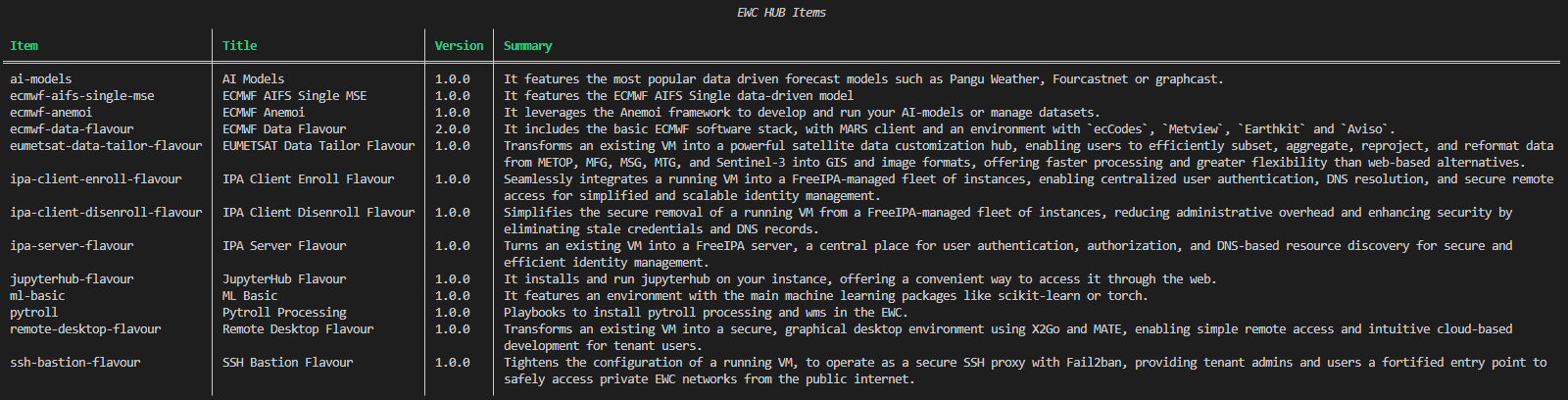
The following command shows the current available Items. Official Items are listed here.
ewc hub list
Deploy Items from the catalog
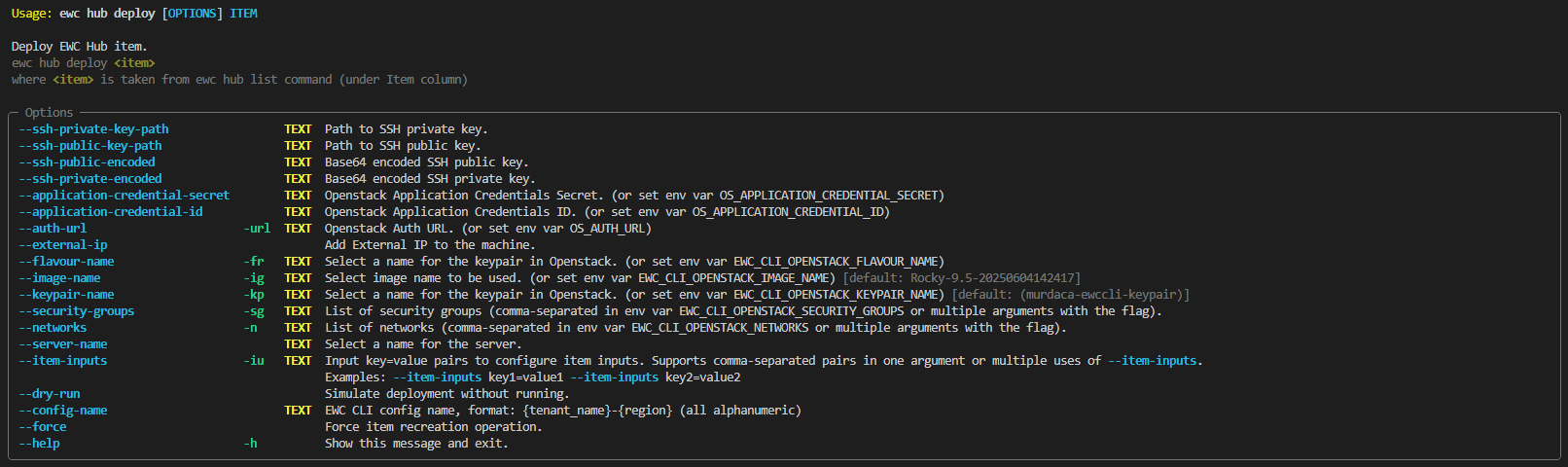
ewc hub deploy ITEM
where ITEM is taken from ewc hub list command under Item column.
Test Items unreleased or from private sources
If you would like to test the deployment of:
-
an Item with private source code (local or remote)
OR
-
a new Item, not yet published in the EWC Community Hub
OR
-
a new version of an Item, not yet updated in the EWC Community Hub
you can take advantage of the --path-to-catalog to point the EWCCLI to the correct source location, and deploy the Item to your target tenant of choice.
Preparing a test
Create a local catalogue file, named ./custom_catalog.yaml, with the complete metadata for your Item.
For reference see the example excerpt of Item metadata, with optional EWCCLI compatibility, enclosed in red below. You can find more concrete examples by browsing over metadata of Items already indexed in the catalog. Additionally, all details about required or optional attributes can be found on the schema documentation.
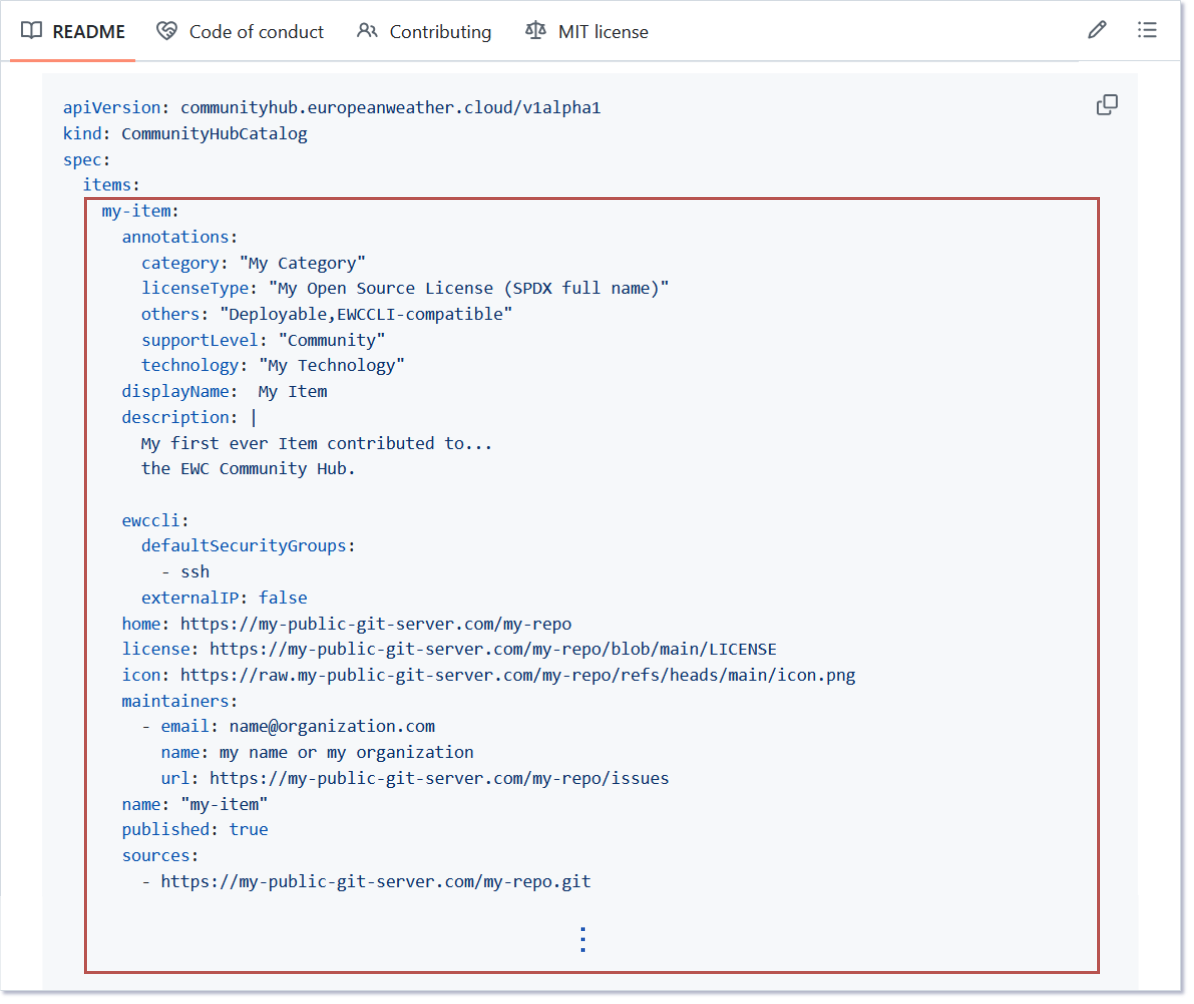
Attributes of particular interest during Item development and testing include:
ewccli.externalIPis a flag used to assign a public floating IP address to the target VMsources, which can be:- Public GIT repository URI
- Absolute path to a local directory with the Item. The path needs to point to an existing non-empty directory
values.inputSpecis the list of inputs you want the user to be able to provide. Any input without default values is treated as required; users can set them when prompted during deployment, or by passing the--item-inputsarg as part of the deploy command.values.osImageName, which can be:- The full name of one of the OpenStack image listed on the EWC Knowledge Base
- The short name of the the OpenStack image; the EWCCLI will auto-resolve to the latest available minor version for the specified operative system
values.osSecurityGroupsis a list of OpenStack Security Groups assigned to the target VM such that network traffic can reach it on certain ports.values.pathToMainFileis the relative path to your directory or repositoryvalues.pathToRequirementsFileis the relative path to your directory or repository
Running a test
Once metadata is correct and complete, execute list, show or deploy commands as needed:
ewc hub --path-to-catalog ./custom_catalog.yaml list|show|deploy
ewc hub --path-to-catalog ./custom_catalog.yaml show
ewc hub --path-to-catalog ./custom_catalog.yaml deploy
Backends
This section described the backends used and which commands are backed by those backends.
Openstack
Used by infra and hub subcommands.
Ansible
Used by hub subcommand.
Terraform
Used by hub subcommand. (COMING SOON)
Kubernetes
Used by dns, s3, k8s subcommmands. (COMING SOON)
SW Bill of Materials (SBoM)
Dependencies
The following dependencies are not included in the package but they are required and will be downloaded at build or compilation time:
| Dependency | Version | License | Home URL |
|---|---|---|---|
| requests | 2.32.5 | Apache Software License (Apache-2.0) | https://requests.readthedocs.io/en/latest |
| click | 8.1.8 | BSD-3-Clause | https://github.com/pallets/click |
| rich | 14.1.0 | MIT License | https://github.com/Textualize/rich |
| rich-click | 1.8.9 | MIT License | https://pypi.org/project/rich-click |
| prompt_toolkit | 3.0.51 | BSD-3-Clause License | https://python-prompt-toolkit.readthedocs.io/en/stable |
| pyyaml | 6.0.2 | MIT License | https://pyyaml.org |
| cryptography | 45.0.6 | Apache-2.0 OR BSD-3-Clause | https://github.com/pyca/cryptography |
| openstacksdk | >=4.6.0,<5 | Apache Software License (Apache-2.0) | https://docs.openstack.org/openstacksdk/latest/ |
| ansible | 10.5.0 | GNU General Public License v3 or later (GPLv3+) (GPL-3.0-or-later) | https://www.redhat.com/en/ansible-collaborative |
| ansible-runner | 2.4.1 | Apache Software License (Apache Software License, Version 2.0) | https://ansible.readthedocs.io/projects/runner/en/latest |
| kubernetes | 33.1.0 | Apache Software License (Apache License Version 2.0) | https://github.com/kubernetes-client/python |
| pydantic | 2.12.5 | MIT License | https://github.com/pydantic/pydantic |
Build/Edit/Test Dependencies
The following dependencies are only required for building/editing/testing the software:
| Dependency | Version | License | Home URL |
|---|---|---|---|
| pytest | 8.4.1 | MIT License (MIT) | https://docs.pytest.org/en/latest |
| pytest-html | 4.1.1 | MIT License (MIT) | https://github.com/pytest-dev/pytest-html |
| pytest-mock | 3.14.1 | MIT License (MIT) | https://github.com/pytest-dev/pytest-mock |
| coverage | 7.10.5 | Apache Software License (Apache License Version 2.0) | https://github.com/nedbat/coveragepy |
| pre-commit | 4.3.0 | MIT License (MIT) | https://github.com/pre-commit/pre-commit |
| sphinx | 8.1.3 | BSD-2-Clause License | https://www.sphinx-doc.org/en/master |
| sphinx-click | 6.0.0 | MIT License (MIT) | https://github.com/click-contrib/sphinx-click |
| sphinx-rtd-theme | 3.0.2 | MIT License (MIT) | https://sphinx-rtd-theme.readthedocs.io/en/stable |
| pydeps | 3.0.1 | BSD-2-Clause License | https://github.com/thebjorn/pydeps |
Changelog
All notable changes (i.e. fixes, features and breaking changes) are documented in the CHANGELOG.md.
Contributing
Thanks for taking the time to join our community and start contributing!
Please make sure to:
-
Familiarize yourself with our Code of Conduct before contributing.
-
See CONTRIBUTING.md for instructions on how to request or submit changes.
Development
- Fork this repository and move into it
git clone https://github.com/ewcloud/ewccli.git && cd ewccli
- Activate the virtual environment
source ./ewcclienv/bin/activate
- Install the package for testing
pip install -e .[test]
-
Modify the local code and test changes.
-
Push code to your fork and open a pull request.
Code Styling
Execute all linting tests by running:
pre-commit run --all-files
This will provide you with hints about:
- Basic format of the files (i.e. spacing, line breaking, etc.) using
black - PEP standars infringement flagged by
flake8 - Static typing and type hinting recommendations given by
mypy
Resolving Style Issues
To enforce basic formating issues , run:
black ./
Currently, there is no automated way of addressing errors raised by flake8 and mypy.
To resolve those, check the logs from the pre-commit execution, understand the type of error and adjust the code accordingly.
Code Unittesting
Execute all tests in all test files by running:
pytest
Execute all tests in a test file
pytest ewccli/tests/ewccli_commands_hub_deploy_server_test.py
Execute a specific test in a file
pytest ewccli/tests/ewccli_commands_hub_deploy_server_test.py::test_no_matching_images
Execute a specific test in a file with verbose
pytest -vv ewccli/tests/ewccli_commands_hub_deploy_server_test.py::test_no_matching_images
Coverage Reporting
Generate unittest coverage reports in standard formats by executing:
coverage run --module pytest --no-header --verbose -ra --junitxml=coverage.xml --html=coverage.html
Documenting
Generate documentation from source code docstrings:
sphinx-build -b html docs/source/ Documentation/
Releasing to Package Registries
Checkout RELEASING.md for details.
Copyright and License
Copyright © EUMETSAT, ECMWF 2026
The provided code and instructions are licensed under GPLv3+. They are intended to automate the setup of an environment that includes third-party software components. The usage and distribution terms of the resulting environment are subject to the individual licenses of those third-party libraries.
Users are responsible for reviewing and complying with the licenses of all third-party components included in the environment.
Contact EUMETSAT for details on the usage and distribution terms.
Authors
- Francesco Murdaca - Initial work and maintainer - EUMETSAT